
Download TikTok Videos on iPhone
- Works in Safari
- No App Store App
- Saves to Files
- Add to Home Screen
For iPhone and iPad
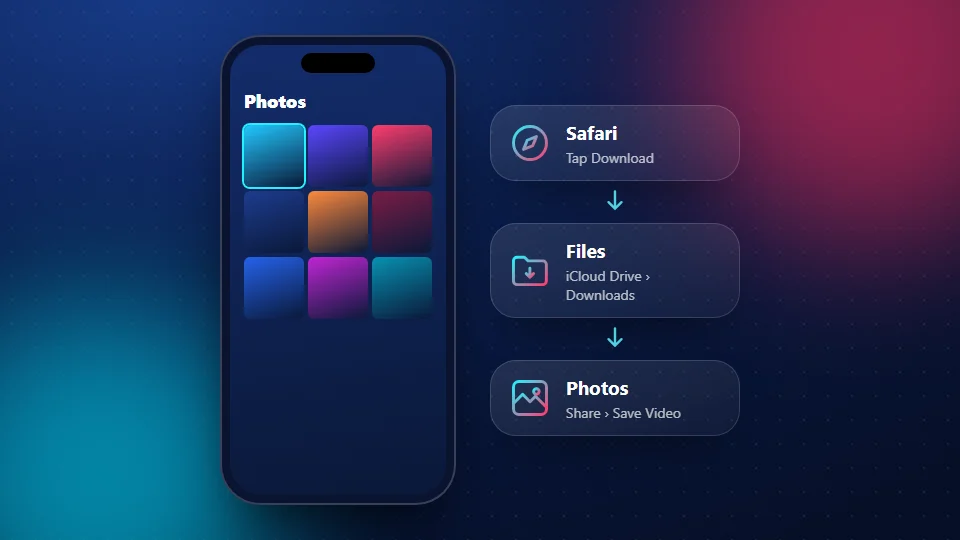
Download TikTok videos on iPhone with SnapTik in Safari, with no app and no watermark. The video saves to the Files app first. Then two taps move it into Photos. This guide shows each screen, plus fixes for the moments when a button isn't where you expect it.
Before you start
- Use Safari. Other browsers on iPhone often can't save files properly.
- Check your space. A 1080p clip can be a large file. Free up a little storage if your phone is nearly full.
How to download TikTok videos on iPhone
Copy the link
In TikTok, tap Share on the video, then Copy link.
Open SnapTik
Open Safari and go to snaptikhd.org.
Paste the link
Paste the link into the box and tap Download. Pick the size you want from the list.
Confirm the download
Safari asks whether you want to download the file. Tap Download.
Find the file
Open the Files app and go to iCloud Drive > Downloads. You can also tap the downloads arrow in Safari's address bar to jump there. (Apple explains where downloads go.)
Save it to Photos
Tap the video to open it, tap the Share icon, and choose Save Video. Now it's in Photos.
Save MP3 sounds and slideshow photos on iPhone
The same steps work for sounds and photos. Tap MP3 instead of an MP4 to save the audio; it stays in Files and plays from there. For photo posts, single pictures can go straight to Photos with Share > Save Image. A ZIP of all photos unpacks with one tap in Files.
Add SnapTik to your Home Screen
There's no SnapTik app in the App Store, and you don't need one. You can still open it like an app:
- Open snaptikhd.org in Safari.
- Tap the Share icon.
- Scroll down and tap Add to Home Screen, then Add.
Using an iPad
The steps are the same on an iPad. Safari may show the download in a small panel at the top right instead of a pop-up. Files and Photos work exactly as on iPhone.
Fixes when you can't download TikTok videos on iPhone
More fixes are in our troubleshooting guide.
No download prompt
You may be in another browser. Open the page in Safari and try again. Content blockers can also stop the prompt, so turn them off for snaptikhd.org.
Can't find the file
Look in Files > iCloud Drive > Downloads, or tap Recents in Files. If you changed Safari's download location in Settings, check that folder.
Save Video is missing
Make sure you opened the file itself, not a preview of the folder. If you saved an MP3, there's no Save Video option, because it's audio.
Video has no sound
TikTok may have muted the song for copyright reasons. Check the post in the TikTok app; if it's silent there too, the file will be silent.
Pros and cons
Pros
- No app or App Store download needed
- No watermark, real quality labels
- Works for videos, sounds and photos
- Can be added to your Home Screen
Cons
- One extra step to move videos from Files to Photos
- Works best in Safari only
- iOS updates can move buttons around
- Public posts only
Frequently Asked Questions
Do I need an app to download TikTok videos on iPhone?
No. SnapTik works in Safari. Add it to your Home Screen if you want one-tap access.
Where do downloads go on iPhone?
Safari saves them to iCloud Drive > Downloads in the Files app. From there, use Share > Save Video to move a video to Photos.
Can I use Chrome on iPhone?
Safari works best. Chrome on iPhone may open the video instead of saving it.
Will the video have a watermark?
No. The MP4 files you save from SnapTik don't carry the TikTok logo.
Can I save straight to Photos?
Not directly. iOS sends browser downloads to Files first, which keeps your photo library safe from random files. Moving it takes two taps.
Is it safe?
SnapTik never asks for your TikTok login and can't see your photos or account. You only download the file you choose.
Is SnapTik linked to TikTok?
No. SnapTik at snaptikhd.org is an independent tool. We are not part of TikTok or ByteDance. It's simply a free way to download TikTok videos on iPhone.